

Sale
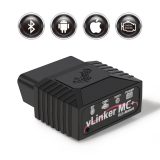

Description: 100% Original Vgate vLinker BT3.0/4.0/WIFI: Compatible with 99% world car models1.Data buffer up to 2K bytes, UART baud rate increased to 500Kbps2.Support Almost All ELM327/ELM329 Adapter Software3.Automatic sleep and start to reduce power consumptione4.OBD2 Standard Protocols More protocols5.Support user-defined commands6.Request bytes up to 1024 bytes7.Support Firmware Update8.Support user-defined APP9.Support GMLAN and HS/MS-CAN (for Ford / GM)10.15 ELM protocols/23 STN protocols/64 User-defined protocolSupport: Engineered to accelerate performance over the Bluetooth link, Vgate vLinker MC is up to four times faster than beforThe Vgate vLinker MC Bluetooth OBD-II adapter provides access to SW-CAN & MS-CAN networks in addition to all legislated OBD-II protocols.Why should we choose Vgate vLinker MC Bluetooth?– Vgate vLinker MC series is the upgraded version of Vgate iCar Pro, specifically for coding APP that requires large amount of data transmission.– Supports SW-CAN & MS-CAN protocols – can access these proprietary GM & Ford networks in addition to the 5 standard OBD-II protocols.– Vgate vLinker MC Bluetooth 0BD2 turns your iOS, Android or Windows mobile device, tablet, laptop, or PC into a sophisticated diagnostics tool and performance monitor.– OBD request byte up to 1024 bytes, can meet the needs of some special long frame communication.– USART data buffer up to 2K bytes, baud rate increased to 500Kbps. Even faster, more reliable, and more feature-rich than its predecessors.– Fully compatible with ELM’s AT command set (ELM327, ELM329) and STN’s ST command set.– Read & clear check engine light – Check diagnostic codes yourself and make informed repair decisions.– Support online firmware updates and over-voltage, over-current, over-temperature and battery drain protection.Typical Applications:Vehicle telematicsFleet management and tracking applicationsUsage-based insurance (UBI)OBD data loggersAutomotive diagnostic scan tools and code readersDigital dashboardsVgate vLinker MC Bluetooth Operation Steps – Reference for Android users# Android System Operation Steps ** – Vgate vLinker MC 1. Insert the product into the OBD interface of the car.2. Turn ignition to Key On Engine Off Position3. Turn on Bluetooth on the phone.4. After pressing the Black Button on the product, the device name can be found on the phone. (Important Operation)5. NOTE: Search for the device name ‘vLinker MC’ or ‘vLinker MC-Android’and click Pair. (For Android system) Attention!! Do not pair ‘vLinker MC ’ or ‘vLinker MC-IOS’6. Enter the pairing code: 1234 . If the pairing is successful, you can open the APP to set up the connection.# iOS System Operation Steps ** – Vgate vLinker MC 1. Plug the product into the OBD2 interface of the car.2. Turn ignition to Key On Engine Off Position3. Turn on Bluetooth on the iOS phone.4. No need to configure Bluetooth device name in the iOS phone. Just enable Bluetooth button on the iOS device and continue to the OBD app Setting.Package included:1 x Vgate vLinker( BT3.0 / BT4.0 optional)1 x User Manual
Your custom content goes here. You can add the content for individual product